Showing posts with label andover high school. Show all posts

Monday, November 24, 2014

Instructional Technology & Digital Learning Update For November 1st -7th 2014 Andover Innovation Lab & Help Desk


Parth Valecha Andover Innovation Lab Student Inducted Into National Honor Society At Andover High School

I had the opportunity to attend the national honor Society induction because one of my former students that I had at the Andover innovation lab had selected me as a teacher who had inspired them. Parth Valecha  had worked on a business project last year during his time at the Andover Innovation Lab which combined bluetooth technology for headphones and sports which required swimming or boating. Parth and I had many in-depth conversations on his business plan and how he could more narrowly target his market.  It was an honor that he had invited me to this important event and selected me as a teacher. Parth is a hardworking student who will surely be successful in any venture he takes on.

Release Of Our Help Desk Promotional Video
With the editing of Dan Brennan and the assitance of some of our help desk students we have been able to produce a video which outlines the work we do at the Andover innovation lab & Help Desk.
Check it out below!


Math Department Head Working On Blog With Bryce Corbitt

This week Bryce Corbitt from the Andover innovation lab also began working on the Math Department website with Math Program Coordinator Katherine Richards. They were able to determine a layout that they would like to use with Google sites and also begin to conceptualize some of the content that will be included on the site.  Bryce is been a great asset to the team this year and I know he will do a great job working with Ms. Richards.  This project will probably take the next couple months to complete and will become one of his projects. Bryce has been a great resource to several teachers with his great attitude and approach to helping.


Homework Document for Google Drive

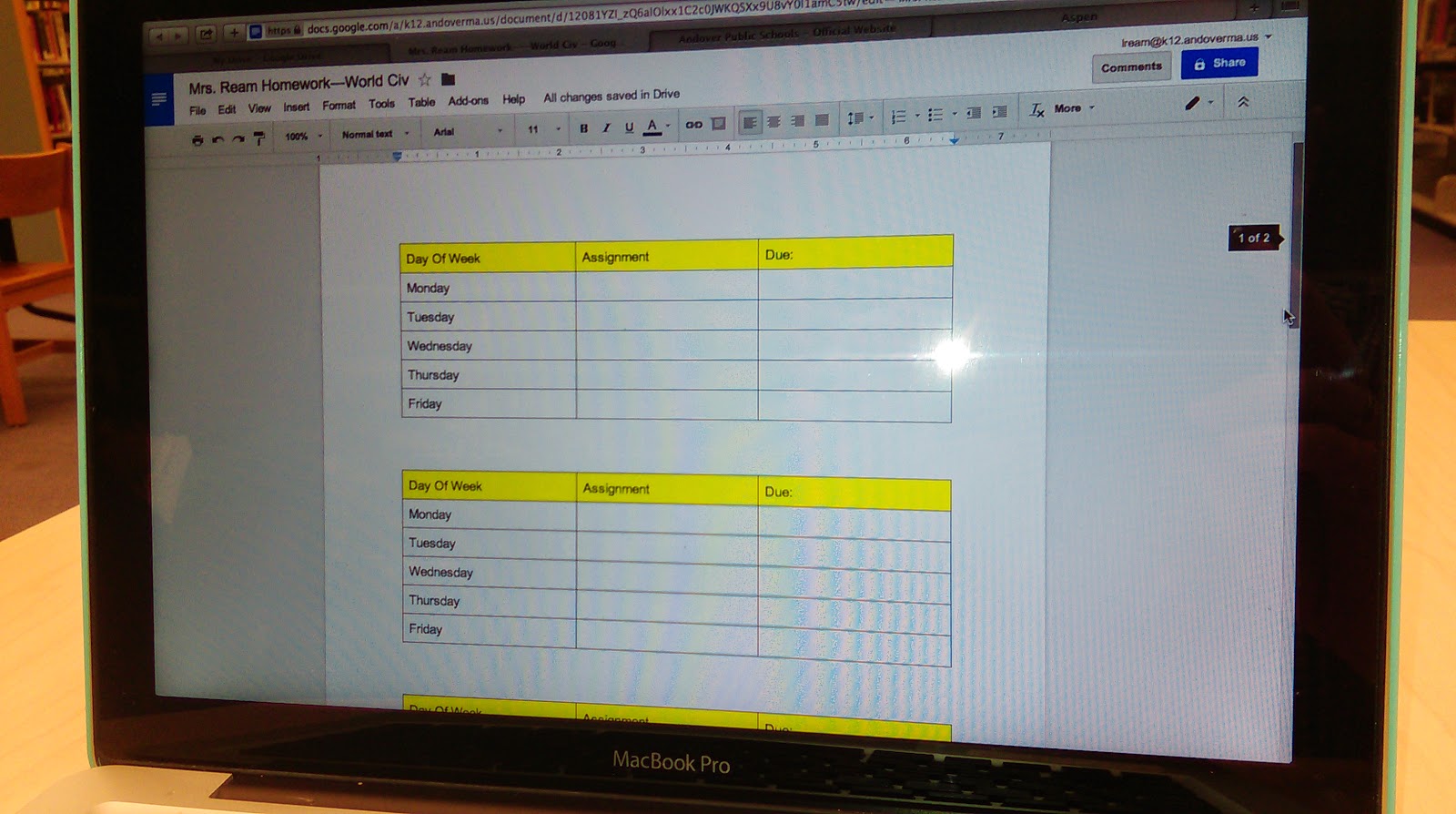
In the process of trying to simplify how to add homework in a streamlined way and Sherrett with parents and students using Aspen I have been showing the use of a Google doc with a shorten link.  On this Google doc I create a table and organize the tables according to the days and weeks of the school day this is an opportunity to keep it consistently organized homework schedule on a live document that teachers do not have to go into Aspen to edit.  This is one of the huge benefits of Google Docs and using shortened personalize the links in order to share materials.  By being able to edit the doc you can consistently update the homework assignments with those who view the consistent link located on the Aspen pages.


Best Practices for Sharing & Editing With Google Drive

I recently started having conversations with both the English and Social Studies Department members about creating a series of best practices for the use of Google Docs and the editing of longer papers.  This process requires an in-depth look at what are the best ways of using the commenting features, sharing features and add-ons that are available with Google Apps for Education.

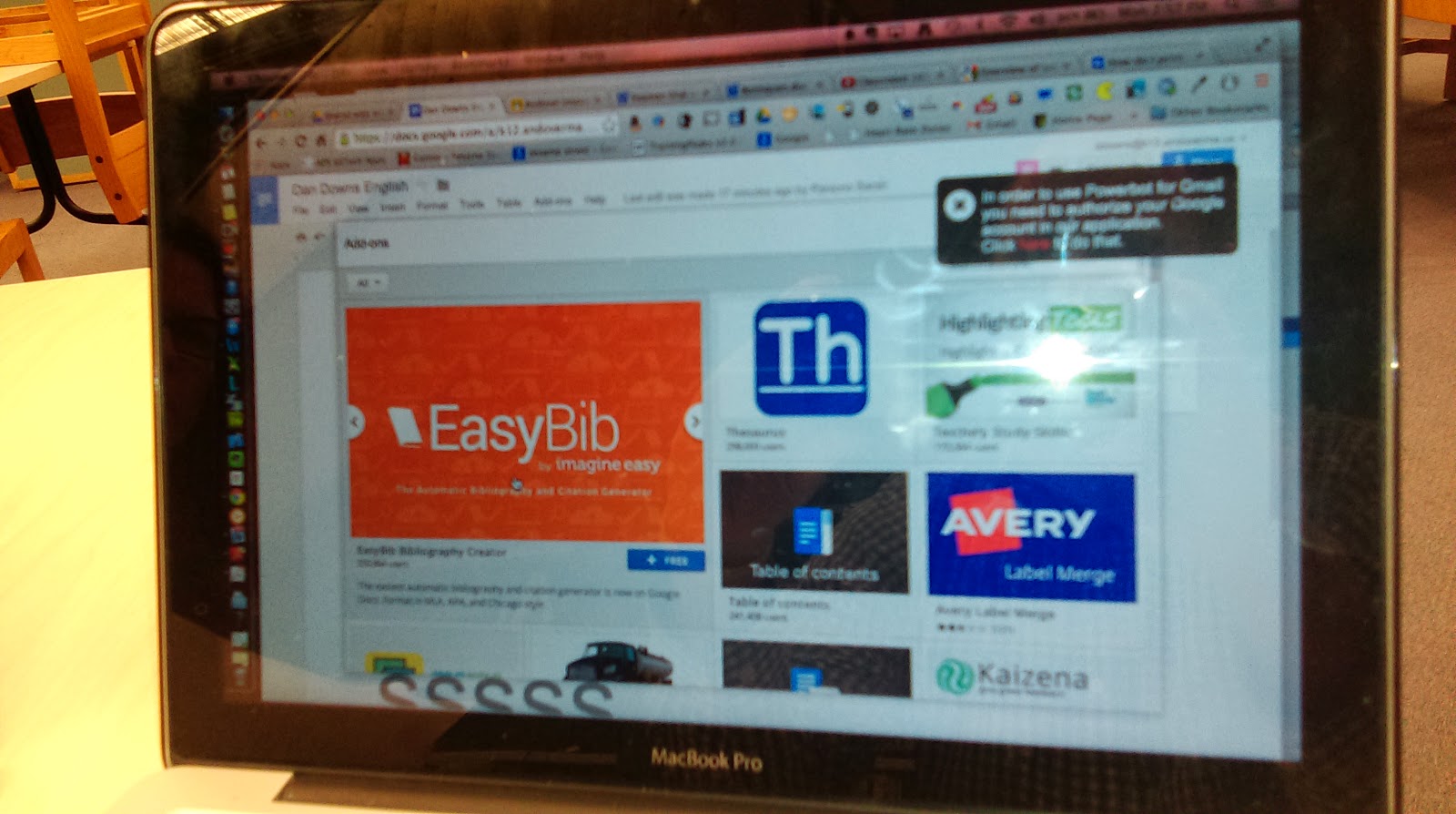
One of the very cool add-ons that’s available is the Easy Bib for Google docs.  This add on enables students to select a piece of text in their paper and then search for a source for citation on the add one. 


The add on locates the source and adds the citation to an area at the bottom of their page and organizes the citations for the student.  This tool ultimately saves a lot of time and helps keep citations organized within a document.


Flubaroo Training-Tech Byte

This past week I conducted a training for the use of Flubaroo at the Andover Public Schools Tech Byte training. Flubaroo is a great add-on to assist with grading quizzes that are you created with the Google Apps for Education Forms documents.  I have created some tutorial videos that I will link to which shows you how to get started with using Flubaroo and how it can improve the way in which you streamline your quizzes that you provided classes. View Part 1 Of My Video Series On Flubaroo.


Pixlr Tool as Web Based Photoshop Alternative
This past week I was able to recommend the Pixlr tool to our web design teacher Mike Messina.  He was looking for a web-based alternative to Photoshop that allowed him to create graphics of different resolution and size and also enabled the ability to add different types of text and layer styles.  This tool is a great web-based tool that allows you to download any of the images that you create as well as upload images into use within the interface.  Definitely check this tool out if you're on a computer that you're not used to working on our really just need a great web-based option and don’t have Photoshop.

Sunday, October 5, 2014

Instructional Technology Weekly Update-Andover High School & Wood Hill Middle School-Andover Innovation Lab September 29th-October 3rd 2014


This week I had the opportunity to learn more about Nettexts at Woodhill Middle School. Sara Mensale the Digital Learning Specialist at Woodhill Middle School and I participated in professional development with several groups of teachers from the school. Nettexts is a web based application for a variety of platforms which enables the creation of lessons,units and entire curriculums using Open Educational Resources often called OER.  It was great to get a refresher on how this software can help manage open educational resources for teachers who want to implement them into their courses.


At the Andover Innovation Lab and Help desk we had a busy week with students preparing their Project Development Forms which help them outline three formative projects they will be working on over the next several weeks. All of the students are very motivated to work on this phase of their projects and they have all been so productive this semester so far. I really expect that in this phase we will really see their projects take shape and they will start to see their research pay off. This week Andre D.  is a student of the week he has been busy working on his Android Studio project and is finding resources to get his project moving.

To view these documents and the students blog please visit:
http://www.andoverinnovation.com


All of the blog entries found on the website this week will relate to the students ability to complete the Project Development Form and give us more insight into what their thoughts are about their projects as they move forward. Take a minute to view the finished blog entries on the website and read all the entries for this week.  The students  have all shown a great level of interesting applying technology to their learning.


In terms of assisting teachers around the high school this week Bryce Corbitt started with updating the iPad cart for the Social Studies department. Bryce was eager to get started with this and learn how the iPad's could be updated and how new apps need to be added to the iPad's and need to be cleared for new projects. He will continue working on these projects for teachers in the next coming weeks. Be sure to check out my screencast video of the expectations of this week's work and what the potential projects and items on our to do list where.


This week Dr. Lord decided to share out many department members websites that have been in the development over the past couple weeks. Here is a  link to his blog which contains the links he shared out in the past week. 
Dr. Lords Blog
I had a great time collecting them from teachers. With speaking to teachers about these blogs I had great discussions about the content and the direction they were thinking of taking. In the past week I've also had an amazing opportunity to begin the training of some of the high school teachers with the use of Google Sites and Google classroom.


Many teachers have decided to build websites not only by working with me but also taking the TechByte  trainings with Joanne Najarian at the central office on Tuesdays. I've begun to introduce teachers to the classroom and how the documents can be easily shared amongst each other. I think one of the huge benefits of working with in the high school so closely is my opportunity to sit down with teachers in their break rooms and discuss how I can help them with technology. One of the departments that I've gotten to know more closely is the World Language Department in which we can share a variety of strategies for organizing audio files and also creating websites to help them teach. We have also worked closely to create forms for students to submit information for quizzes and surveys in a variety of languages.


This is an exciting time of year with teachers and technology. We are in a time of great experimentation and transition. Each week I see a transition of skills and adaptability to use technology in the classroom.


Monday, September 29, 2014

Andover Innovation & Instructional Technology Update Week Of September 22-26 2014 - Google Sites & Classroom -1:1 Initiative

This past week I spent a number of appointments with teachers introducing them to the benefits of Google Classroom,Google Sites and web based google documents and calendars. As I introduce the interface of Google Classroom to teachers it is amazing how this platform will improve the communication and sharing of assignments between students and teachers. This video from Google helps explain this interface.


Helping to assist teachers in adopting Google sites has also been relatively seamless. Teachers quickly choose to create a site within their login then choose a template and start choosing their page names. This is by far one of these easiest tools to quickly get teachers on board with organizing their resources for the classroom.


In the photo above Spanish Teacher Tom Powers investigates transferring his classroom to Google Classroom. We had the opportunity to discuss the pro's and cons. Tom likes the ability to add assignments seamlessly but would like a better way to share his homework postings.


I worked with Health Teacher Jackie Salvensen to upload a number of her Word documents into Google Drive. The upload took longer than we expected so we made a follow up appointment to complete the process. Completing this process will enable her to back up her documents and also to share them more easily as links to others.


I was also able to have a follow up appointment with Adriana Gonzalez to help her add a homework calendar using Google to her Blogger Blog. Adriana has worked hard to get her blog up and running to share resources and documents.


Web Design Teacher Michael Messina shared with his students the The Creative Process In 10 Steps with his class. This is a video he introduced to help students be inspired as they embark on the concept development stage of their web design process.


This past week brings together a number of components related to educational technology initiatives in the Andover Public Schools. Andover teachers are at a crossroads in which hopefully in a short number of months teachers in the 8th grades will have classrooms in which all students will have their own Macbook Air computer.


On Monday night(9/30) the parents of these students will have the opportunity to weigh in on their opinions and perspectives on this initiative. The planning and professional development strategies for teachers related to this goal are also a huge responsibility becuase we need to support the learning of the students as well as the teachers adaptation to having the consistent access to devices with their curriculum.


The Mac platform enables a high level of scalability for both the teachers and the learning curve for the students. It also makes the process of protecting the city’s network easier. In my opinion the district is ready for this shift. We are ready to embrace the wonderful new challenges to support teachers and embrace the new engaged learning environment this will create for students.


Monday, September 15, 2014

Instructional Technology & Digital Learning Update Andover High School-Week Of September 2-5 2014


The startup of the Andover Innovation Lab/Help Desk was great as we have 7 students beginning projects. The new format at the help desk will have students creating webcasts. They are also going to be blogging soon about their projects and I look forward to reading about their learning process and projects. Students are ramped up to participate in ways to help assist teachers with the use of technology in their classrooms.


The District’s Tech Con has once again started the year with a bang and I had the great opportunity to present on a variety of Project Based Learning Technology Tools for the classroom and also presented on the Integration Of Social Media Into Our School District with Director Of Digital Learning Joanne Najarian. I have included the links to our presentations below.


New photo added to gallery

I have had many opportunities to discuss the implementation of the Lego Mindstorm Kits into the Middle School science curriculum with Steve Sanborn the Program Coordinator for the Science/Engineering Department in Andover. Its great to see the enthusiasm he has for this program and the opportunities this program will present for the integration of coding,engineering and robotics into his program.
New photo added to gallery


It was rewarding this week to reconnect with the teachers about technology and see where their goals are at for the year. I had the opportunity to work with Louise Cummings and her team in the Transitions Program at the high school to integrate Google Calendar across their computers so they could manage the support for different students needs.  

On additional professional levels I just completed the development of a curriculum for a course in “Web Application Development” for Bunker Hill Community College. This course includes to ebooks which delve into the context of web applications in the modern world of web development as well as a technical project which allows students to work their way through a project through the course. I am proud to complete the development of this course and look forward to its implementation.

So we have taken off with a huge push and plan on completing so many new technology projects this year! Looking forward to a great year of collaboration,sharing and learning with the fine teachers,administration and staff of the Andover Public Schools

Sunday, September 7, 2014

Instructional Technology & Digital Learning Update Andover High School Week Of August 25-28 2014

Over the course of the summer I had d the opportunity to teach ,develop new curriculum and view the transformation of a variety of classroom and library spaces for the Andover Public Schools Digital Learning Department.

Summer Work
I taught a Web Design & Development course at Minuteman High School for 3 weeks which enabled me to review and research new tools for the new Web Development course  which is going to be rolled out this fall at Andover High School. The Web Design & Development course is one of 3 new courses which in include Game Development and Exploring Computer Science course. These courses are part of the newly formed Digital Learning Department at Andover High School.


As preparation for the new Exploring Computer Science course I participated in a great  training at Google in August with the new Digital Learning Teacher Michael Messina. We were
not only able to witness the “Google “ work experience but also got great training in making computer science more equitable for a wide range of students. The experience at Google was fantastic and getting to know many of the other teachers participating in this opportunity was extremely rewarding.


Early in the summer I was able to use mobile application development curriculum that I had been developing with a grant with the National Science Foundation and Bunkerhill Community College. The course uses video screencasted tutorials and sequenced code lessons to enable students to create an Android Mobile Application. This was a rewarding opportunity to begin teaching this curriculum  which I had been  developing with a former student of mine over the past year.

Teacher Successes 2013-2014
I was also able to reflect on the success of the teachhers with technology at Andover High School. So many teachers challenged themselves with adopting Google Docs and so many new web 2.0 tools to enhance their teaching. The students who participated in the first year of the Andover Innovation Lab produced so many amazing projects and experiences. Moving forward I have created a new website to showcase their writing and projects anoverinnovation.com. We are excited to be scheduled to present at the Masscue conference in October and be a part of their student showcase and help desk.


In addition to the new website we plan on having a theme introduced each year for students to investigate.  This year we are embracing the theme of creative coding. Students can research open source programming languages to create graphics. Students will have the option to pursue this as opposed to their own tech study. Additional new initiatives for the help desk this year includes a  plan to integrate group webcasts on instructional technolog topics. We want to continually bridge the gap between students skills and application of technolgoy and the teacher’s use in the classroom.

Prototype Classrooms
At the close of the last school year an opportunity arose to update 3 classrooms at Andover High School as well as the Media Center with 21st century learning furniture. During the month of August furniture was dilligently put together and represent three prototype classrooms. The classrooms are aimed to be models of furniture which supports learning with technology and also making classrooms more adaptable and flexible to group learning.


In two English classrooms and one math classroom students have some pretty cool new desks and tables. The library also has new tables and chairs are on the way to have a new 21st century feel to the space. Moving forward this library space will shift from a static space to one in which it will be easier for students to use their laptops and other computing devices to research,communicate and collaborate. We look forward to seeing this space transform.


Tuesday, June 24, 2014

Using The Mac To Create A Podcast Or Video File (MP3)


In this video I create an audio file using Garageband. This can be a great tool for use with language labs because teachers can create their questions and leave a gap of time for students to respond. The program also enables MP3 files which are flexible for use with other programs.

I try to keep this tutorial simple with just a few simple steps to get started. Garageband also enables a range of great audio editing tools which can improve audio quality and volume. The clips can also be easily deleted, copied or pasted as needed.

Podcasts can be a great tool for bringing groups together collaboratively to make an audio project or to work with world languages. This tutorial was inspired by a question from Adriana Gonzalez at Andover High School who requested a way of creating audio files for the language lab which could have the space in time for students to respond. This provides a great way of taking ownership of the language lessons by creating their own content.

Monday, May 19, 2014

Tis the Season For Google Hangouts....End Of Year Assessment Time


At this time of year as the school year draws to a close both at the High School I work at and the Community College I teach at I like to close with something new for the students. This semester I chose to use the collaborative Google Hangout for sharing of course materials,a good laugh at us on a web cam and also a new fluency in technology use and assessment. The sharing of these experiences online is beneficial from a variety of perspectives for both the students and myself.


For a long time I have found video to be a great way to share what a person learns and also how they learn. Google hangouts provide the perfect opportunity to get up to 10 students(others can watch) for a web based video collaboration which has enabled chat features and screen sharing capabilities.


For the final of my PHP programming course at Bunker Hill Community College in Charlestown,Massachusetts I asked students to go online and participate in the hangout and share their collective work for the semester. This was a small class so the format worked perfectly. Students received notification from me on their Google + page to join the hangout and shared their web pages from their chosen server and we also we able to discuss the approach we decided on for our group final project.


This students in this class really responded well to the hangout format and were anxious to share with the technology. When audio issues arrived we were able to utilize the built in messaging service inside the Hangout. This can help communicate between all participants.


I chose to do a hangout on air in which the video is live streamed to the internet and saved to Youtube. This is great for revisiting if you need at a later time.


I found Hangouts relatively easy to use except when some students I sent invites to did not receive the notice in their Google accounts. This can be a little annoying for inviting the members but usually a couple resends solves the problem. I have included the video from my PHP class if your interested in seeing one go down but it is much more fun to have your own!


In the Andover Innovation Lab which is a course at Andover High School for Independent Technology projects students have Google Hangouts as part of their final assessment. I ask that students present and their self driven projects and describe their experiences creating them. I want students to reveal their process and goals as well as the resources they used to get their product. In the video I embedded below, the student created an application using the iOS development tool Xcode and has described his experiences.


Overall the tool is powerful at creating collaboration and sharing with technology. It does take some time to get used to but in the end it can be a powerful web based assessment tool. Its great to be able to ask students to present in this way. It makes them think about their presentation in a real world construct.

Saturday, May 17, 2014

Instructional Technology Update Andover High School Week Of March 31st-April 4th Google Groups & Forms

This week was a great week of working with teachers implementing a range of Google tools for collaborating with students and collecting responses.

The first teacher I worked with was Adriana Gonzalez. I have worked with Adriana on a range of projects during the school year which  integrated technology in her Spanish classroom. In this session we created some Google Forms which will be quizzes she can use across her classes and decrease the amount of time she will need to grade her traditionally assigned quizzes by doing them online. We worked together to create the forms and make simple reusable links to share easily and edit the quizzes for each class.  It took us only about 2 short half hour sessions to get her up and running with her quizzes and she will definitely be saving time in the assessment process moving forward. Each time we work together we are able to make her classroom more web based and easier to access online materials.


Social Studies teacher Lauren Ream was looking for a way to easily have students comment in a web based thread on specific subjects in her Western Civilization course. Lauren and I have already been working on a blog and adding more web based resources to add to her ability to share with her students more easily.

In just a short 1 hour period I was able to work with Lauren and her students to provide them access to creating a Google Group. Access for students was made more easily since students had provided their emails at an earlier time and they could easily be sent the invite. The benefits of creating a Google Group are that you can keep an exclusive or open group in which you can add comments to student posts or post discussion topics. Students add to the topics and create a stream of activity. The group can also be shared with a simple link. Emails can also be sent directly to the group as well.

Mrs. Ream used the Group to enable students to comment on specific classroom topics and to share perspectives. The link form the conversations can also be added to her current blog for revisiting at a later time.

I think from an integration standpoint Google Groups are a great place to start using a web based tool as you can commit to it on any level within your classroom. You can use it for just one assignment or use it for an entire course. Additionally those who are in the group are notified when a post or comment is made in the group. I feel as though this adds the element of being connected to the classroom.

This week I was also able to continue working with Art teacher Teresa Consentino on the development of her blog for her Art Foundations course. This week we worked at getting her older lessons created into PDF form on the scanner and adding the to her Blogger Blog. Creating her blog has been a process of selecting the most important lessons and what will work best being put online. With art it is also a challenge to choose art pieces which reflect a high quality of work and those which show the concrete concepts. We are working to develop her unit on 2 and 3 Dimensional Perspective Drawing. This process has been rewarding as it is a real model of transforming exciting art concepts into web based lessons and easy to navigate links.

On Thursday I had the opportunity to be a Judge at the West Middle School Science Fair. This was a great experience as I got to meet the students and find out more about their projects and what drove their scientific investigation. I spoke with students who did projects related to insulation efficiency,beach erosion and even the strength of spider webs.


I think a great component built into this fair was the integration of the "Green" projects. This really helped students choose to look into environmental issues in their science project and try to solve them. As an Instructional Technology Specialist it was great to visit and view the perspective of the students and their technology,engineering and science integration into their projects.


Friday, May 9, 2014

“Lead With Your Strengths" Program: Mobilizing Students As Leaders At Andover High School

In the Andover High School library today the first meeting of students dedicated to developing their leadership skills met to
begin the vision of Candace Hall the Director Of Human Resources for the Town of Andover. Candace has for a long time wanted to see a dialogue opened between students and community about the issues related to race,ethnicity,diversity and multiculturalism. Candace expressed that the “Lead With Your Strengths “ program has been a long term goal of hers "to see the goal of Martin Luther King fulfilled”.


Students met from 8 am till 11:30 on their half day of school to participate in the program implemented by Dr. Luz Valverde Assistant Principal at the high school, Aixa de Kelley Director Of Guidance and  Dr.Jorge Allen Program Advisor for the World Languages Department. Assiting Dr. Allen and Dr. Valverde was Roberta Hantgan a Fellow from Merrimack College and Digtial Learning Specialist Daniel Downs, Ed.D.


The program included having students complete web based “Surveys Of Character” which helped them self assess their leadership skills,elements of character and reflect on how they can become leaders in their school and beyond. Students engaged in meaningful discussions on expressing their strengths and shared visions for how this program could evolve. All students shared their self-knowledge on a blog dedicated to the cultivation of their ideas and personal perspectives related to their skills and experiences with leadership. 

The blog was implemented to digitally capture student reflections and carry the experiences from this meeting to future participation.

The students had a keynote address from community leader  Pavel Payano who spoke to the students about the importance of setting goals and how to create change in your community by taking a leadership role. Mr.Payano described his experiences working with Student Activities at the University Of Massachusetts in Amherst. Mr. Payano described his experiences using the skills working in his college environment to creating change in his hometown community.

This program has developed out of a vision as part of the “One Andover” project and hopes to create new opportunities for students to develop themselves and become mentors in school and the greater community. The program will also bring awareness to the diversity of culture within the community and present opportunities for student ambassadors to connect with town leadership.

Friday, April 18, 2014

April 14th-18th Instructional Technology Update-Andover High School- Daniel Downs


This week I signed up for Code.org professional development for the implementation of the Exploring Computer Science Program. This training will help teachers in the state of Massachusetts implement the new course becoming fall season. It will require multiple online hangouts online ands a weeklong session in August.

One of the most exciting opportunities with this program is the collaborative professional development between teachers in the state of Massachusetts. It’s a great opportunity to be part of some new course development that once implemented will make ahuge impact as the new standards for computer science are released statewide


 As a district we are preparing for the shift as we had a visit from the head of ECS come and talk to us about the benefits of this program in the background of the grant. We are excited to be part of this opportunity and look forward to implementing the courses next year. We plan on implementing the Exploring Computer Course as well as additional courses as they are offered through the grant.

The Digital Learning Department is continuing to support the creation of a mobile application for Andover high school students. In the past week we have set at some planning sessions on the integration of the app with in the school culture and how it could be used to support the existing website. We look forward to working with Dr. Lord and Director Of Digital Learning  Joanne Najarian
to helping us make this app happen.